
When Datadog flags suspicious traffic, our AI-assisted workflow gathers evidence and posts a recommendation in Slack within two minutes. An engineer still makes the call
🛡️ An Internet Protocol (IP) address is sending unusual traffic. Is it a scanner, a misconfigured client, or legitimate users on a shared network? The alert alone won't tell you.
At SoLo Funds, we built a workflow that uses Datadog alerts and logs to help investigate. It posts the evidence and a recommendation in Slack. An engineer takes it from there.
Datadog gives our teams a shared view of application and infrastructure health. When it flagged suspicious traffic, though, an engineer still had to look through logs, gather context, and work out what to do. Much of that initial investigation was the same from one alert to the next.
We wanted to get that work started sooner. The workflow is designed to deliver an actionable recommendation within two minutes of an alert. It doesn't block traffic: an engineer reviews the findings and makes that call.
What made this interesting wasn't just adding AI. It was deciding which parts of the investigation we could prepare automatically and which decisions needed to stay with people.
An IP address doesn't necessarily belong to one person or one device. If we block it too quickly, we could affect legitimate members. Wait too long, and a potential threat may go unattended.
We needed more than a label saying “suspicious.” We needed enough context for an engineer to decide what to check next. That fits with Google's incident management guidance: alerts should help people respond in time.
We could have sent the available information to a large language model (LLM) and asked, “Is this IP malicious?” But a convincing answer isn't necessarily a reliable one. We wanted engineers to see the evidence, not just the model's interpretation of it.
So we split the work:
That split takes more work to build, but it makes problems easier to pinpoint. The assessment might be consistent while the summary gets a detail wrong. Or the summary might be clear while an engineer disagrees with the recommendation. Those are different issues, and we can examine them separately.
The model doesn't determine the recommendation. If the AI summary isn't configured, the investigation can proceed without it.
The workflow recommends. An engineer decides what happens next.
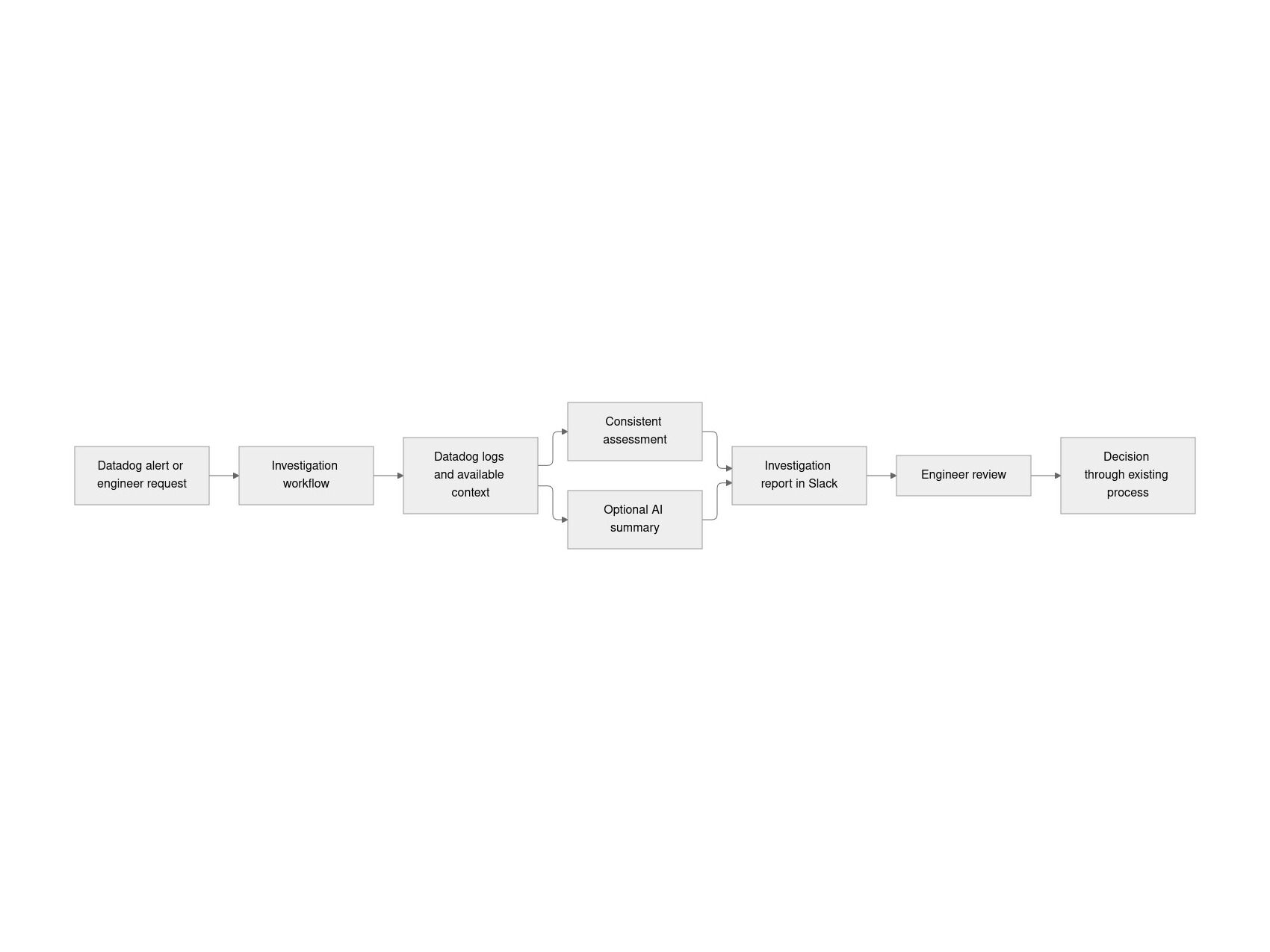
The architecture separates evidence collection, assessment, explanation, and review:

A Datadog alert or an engineer's request starts the investigation. The workflow gathers evidence from Datadog logs and other available context, applies a rule-based assessment, and can add an AI summary. It posts the report in Slack for an engineer to review and decide what to do next.
Delivering the report in the original Slack thread keeps the signal and investigation together:
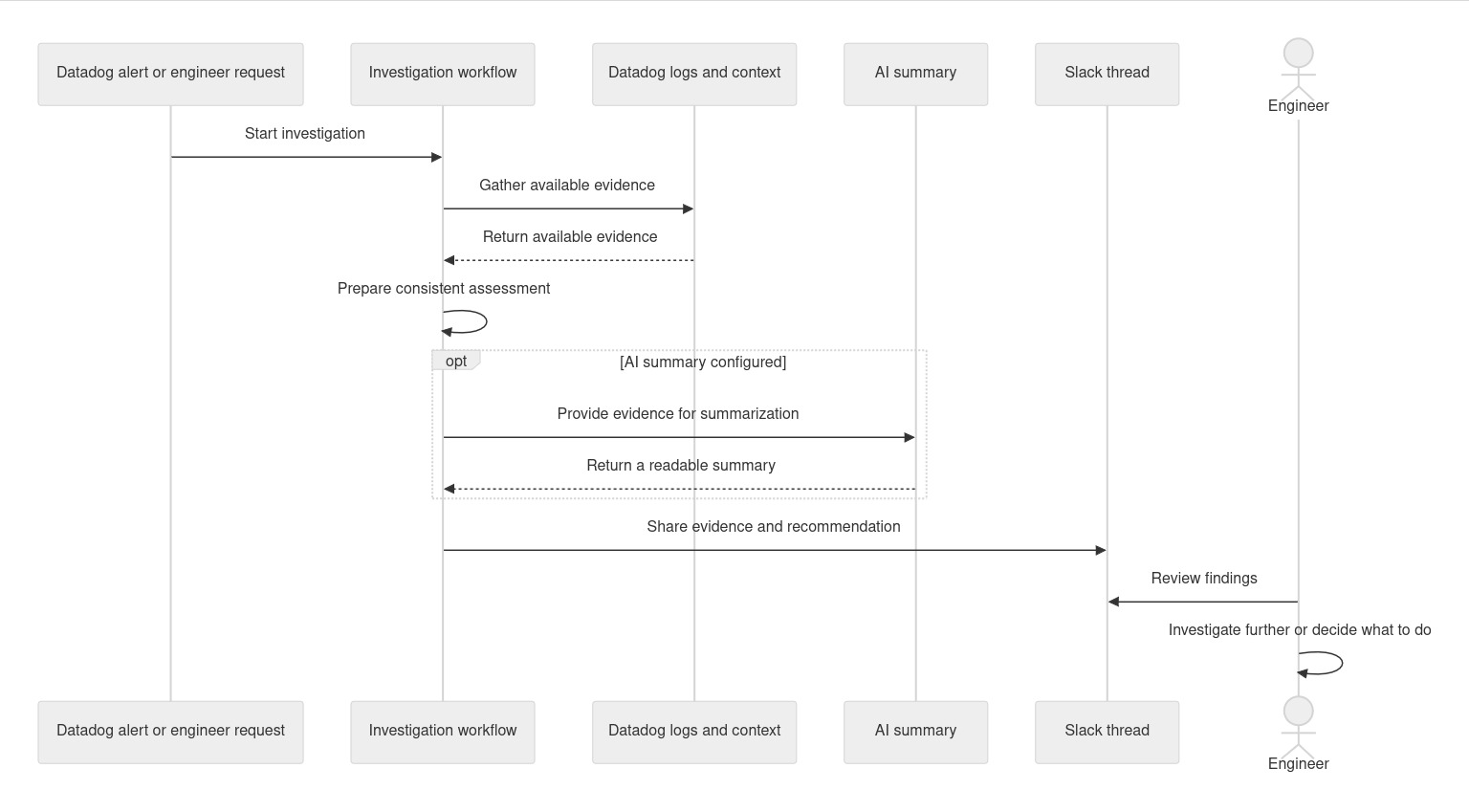
First, an alert or an engineer's request starts the investigation. The workflow gathers evidence from Datadog logs and other available sources, then prepares an assessment. If configured, the AI component summarizes the evidence. The findings go back to the Slack thread, where an engineer can review them and decide whether to investigate further or act.
We put the report beside the alert so engineers don't have to hunt for it. But location only helps if the report also makes the evidence and its limits clear.
Say an address generates a burst of requests, many of which return errors. That might be scanning, or it might be a legitimate client having trouble. Here's what a fictional report could look like:
Illustrative report (fictional, not a production report)
Observation: A burst of requests coincided with errors.
Uncertainty: The pattern alone does not establish intent; a misconfigured client could be one explanation.
Suggested next step: Review the activity and check for a legitimate client before deciding on a response.
Action status: No traffic has been blocked by the workflow.
Suppose the engineer discovers that a legitimate client is retrying failed requests. Instead of blocking the address, they can investigate the client. The report hasn't solved the problem, but it has given them a place to start and evidence they can check.
A summary can miss something or get it wrong. The engineer still needs to check it against the evidence. For teams building something similar, a few principles are worth keeping in mind:
No single safeguard removes all the risk. The right controls depend on the system and the people using it.
Sometimes evidence is delayed or a source isn't available. “We checked and found nothing” is different from “we couldn't check.” If information is missing, an engineer may need to check the source or keep investigating. And if the AI summary isn't configured, the workflow can continue without it; the missing summary isn't evidence either way.
It's worth planning for those gaps. NIST's incident response guidance treats preparation and response as part of managing risk, not separate from it.
A good report isn't just one that reads well. Does it arrive in time to help? Can an engineer check the evidence and spot what's missing? Are similar cases assessed consistently? And does the report save work, or add noise?
We also want to understand when engineers agree with a recommendation, change it, or set it aside.
For teams evaluating a similar workflow, it helps to consider benign and suspicious activity, incomplete evidence, and misleading instructions in source material. Look for false alarms, missed threats, claims the evidence doesn't support, and recommendations that don't hold up to review.
The alert is still the beginning of the investigation. The difference is that an engineer can now start with evidence and a recommendation in the same Slack thread, rather than gathering everything from scratch.
That's the part of this approach we'd carry into other workflows: do the repetitive preparation, make the evidence easy to question, and leave the decision with the person responsible for it.


